Table of Contents
Transfer Data
The new HPC documentation has a more up to date version.
The hostnames on this page are completely outdated and no longer work for HPC users.
Within GÖNET
Using FileZilla
FileZilla is a feature rich, easy to use, cross-platform file transfer utility. If you are not keen on using the command line to transfer your data, this is the right tool for you. Here is short introduction.
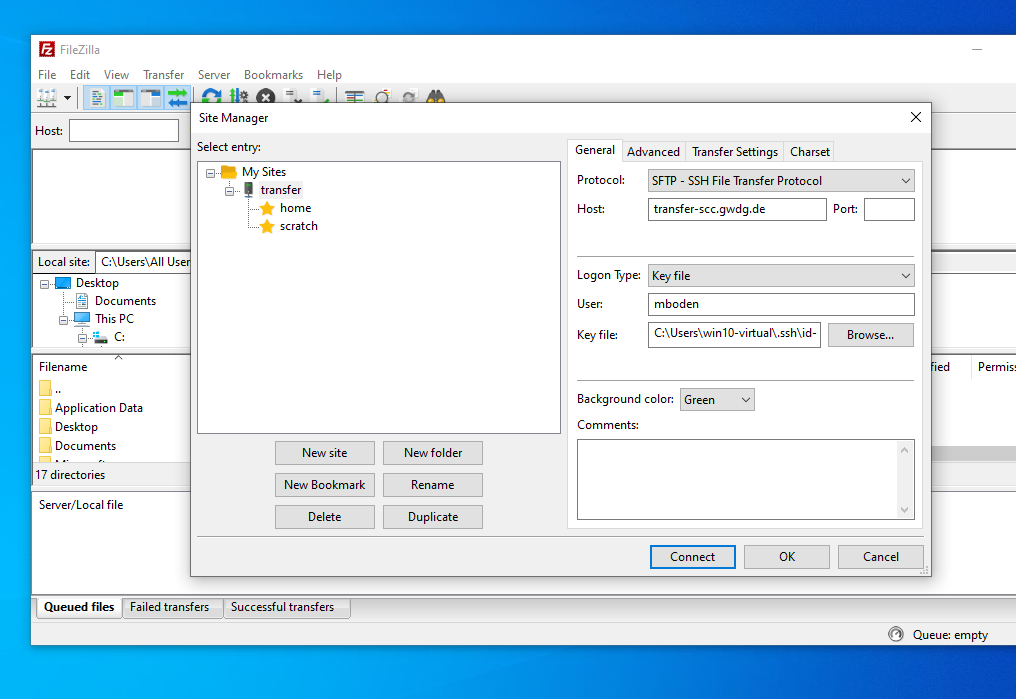 Go to “File” → “Site Manger” and click on “New Site”. Put the required information into the fields on the right. Host either transfer.gwdg.de or transfer-scc.gwdg.de if you need access to /scratch1. From the “Protocol”-drop-down menu choose SFTP.
We disabled the password-only authentication so you have to change the “Logon Type” to “Key file” and supply an ssh key. See Connect with SSH for details on how to generate and upload one, if you haven't already.
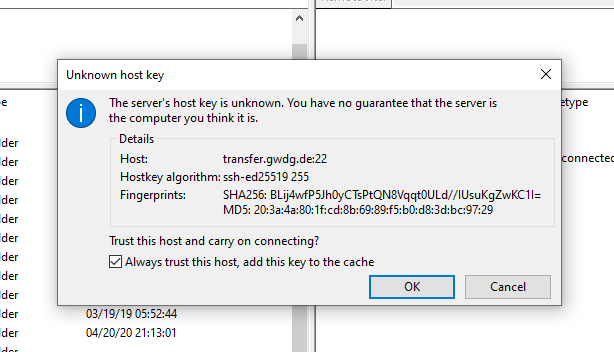 If you connect for the first time, you may be asked to confirm the fingerprint.
You can now transfer data between your local machine and your home on our cluster by drag-and-dropping it from the left pane (or anywhere from your PC) to the right pane. You can also copy from our cluster to your machine.
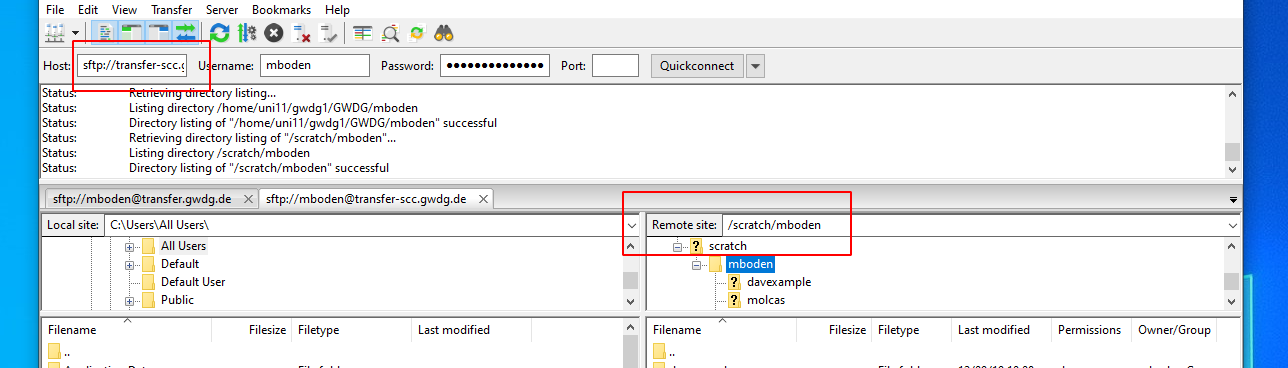 To transfer data to /scratch1, make sure you are connected to transfer-scc.gwdg.de. You can type your scratch directory into the location bar in the right pane.
Troubleshooting
To test if your tunnel is working, you can connect with telnet to you local port 4022:
~ > telnet localhost 4022
Trying 127.0.0.1...
Connected to localhost.
Escape character is '^]'.
SSH-2.0-OpenSSH_5.3
If your local port 4022 is already used, you can use any port above 1024 and below 32768, just change it in all commands.
File compression
If you want to create a compressed tar archive from your files in scratch (e.g. to move it to your archive directory $AHOME), please use a parallel compression tool like pigz. The traditional gzip command can use only one CPU core and is extremely slow. Example to compress the folder project with 4 cores:
PIGZ="-1 -p 4 -R" tar -I pigz -cf project-archive.tar.gz project
You can then move or copy the resulting tar.gz file to $AHOME or via scp/rsync to another system.
ownCloud
You can directly transfer data from and to the GWDG ownCloud by the WebDAV client cadaver. This program provides a command line interface to the ownCloud similar to command line FTP applications. Connect to the server with:
$ cadaver https://owncloud.gwdg.de/remote.php/nonshib-webdav
Authentication required for ownCloud on server `owncloud.gwdg.de':
Username: your-user-name
Password:
dav:/remote.php/nonshib-webdav/>
You can use the usual commands such as cd, ls, cp, etc. to navigate and copy/move files within you ownCloud. Uploading and downloading files can be done with put and get respectively (or mput and mget to transfer multiple files at once).
To change your directory on the cluster itself and list files, use lcd and lls (think of it as local-cd and local-ls). After you are done, you can quit with quit, exit or with CTRL-D. Here are a few examples:
dav:/remote.php/nonshib-webdav/> ls
[... contents of ownCloud ...]
dav:/remote.php/nonshib-webdav/> lls
exampledir  file1
dav:/remote.php/nonshib-webdav/> lpwd
Local directory: /scratch/mboden/dav-example
dav:/remote.php/nonshib-webdav/> mkdir example
Creating `example': succeeded.
dav:/remote.php/nonshib-webdav/> cd example
dav:/remote.php/nonshib-webdav/example/> ls
Listing collection `/remote.php/nonshib-webdav/example/': collection is empty.
dav:/remote.php/nonshib-webdav/example/> put file1
Uploading file1 to `/remote.php/nonshib-webdav/example/file1': succeeded.
dav:/remote.php/nonshib-webdav/example/> put exampledir
Uploading exampledir to `/remote.php/nonshib-webdav/example/exampledir':
Progress: [                              ]   0.0% of 1 bytes failed:
Failed reading request body file: Is a directory
Copying whole directories is not possible. You should create a tar or zip archive first and copy that.
dav:/remote.php/nonshib-webdav/> cd example
dav:/remote.php/nonshib-webdav/example/> lls -la
total 1
drwx------ 2 mboden GWDG 0 Dec  9 10:17 .
drwxr-xr-x 5 mboden GWDG 4 Dec  9 10:17 ..
dav:/remote.php/nonshib-webdav/example/> ls
Listing collection `/remote.php/nonshib-webdav/example/': succeeded.
        file1                                  0  Dec  9 10:10
dav:/remote.php/nonshib-webdav/example/> get file1
Downloading `/remote.php/nonshib-webdav/example/file1' to file1: [.] succeeded.
dav:/remote.php/nonshib-webdav/example/> lls -la
total 1
drwx------ 2 mboden GWDG 0 Dec  9 10:19 .
drwxr-xr-x 5 mboden GWDG 4 Dec  9 10:17 ..
-rw------- 1 mboden GWDG 0 Dec  9 10:19 file1